

Modern technology requires constant use of our thumbs. Gamers and mobile phone users spend many hours each day on digital devices. This repetitive movement puts a heavy strain on the thumb joints. Over time, this strain leads to overuse injuries. The tendons and ligaments become inflamed. Pain starts to interfere with daily activities. Many people ignore the early signs of discomfort. However, untreated pain can lead to chronic conditions.
A thumb splint is an effective tool for preventing these injuries. It is also known as a thumb spica splint. Understanding how to use a thumb splint can prevent long-term damage.
The Risk of Digital Overuse
Gaming and smartphone use involve fast and repetitive thumb motions. These motions are not natural for the hand to perform for long periods. The thumb is designed for gripping and pinching. It is not meant to swipe or tap thousands of times per hour. This constant activity causes micro-trauma to the tissues.
One common condition is inflammation of the tendons on the thumb side of the wrist. Another issue is general joint strain at the base of the thumb. These injuries are now very common among young adults. Symptoms often include a sharp pain when moving the thumb. You might also feel a dull ache in the wrist. Swelling can occur around the thumb joint. Using a thumb spica splint can address these symptoms early.
How a Thumb Spica Splint Works
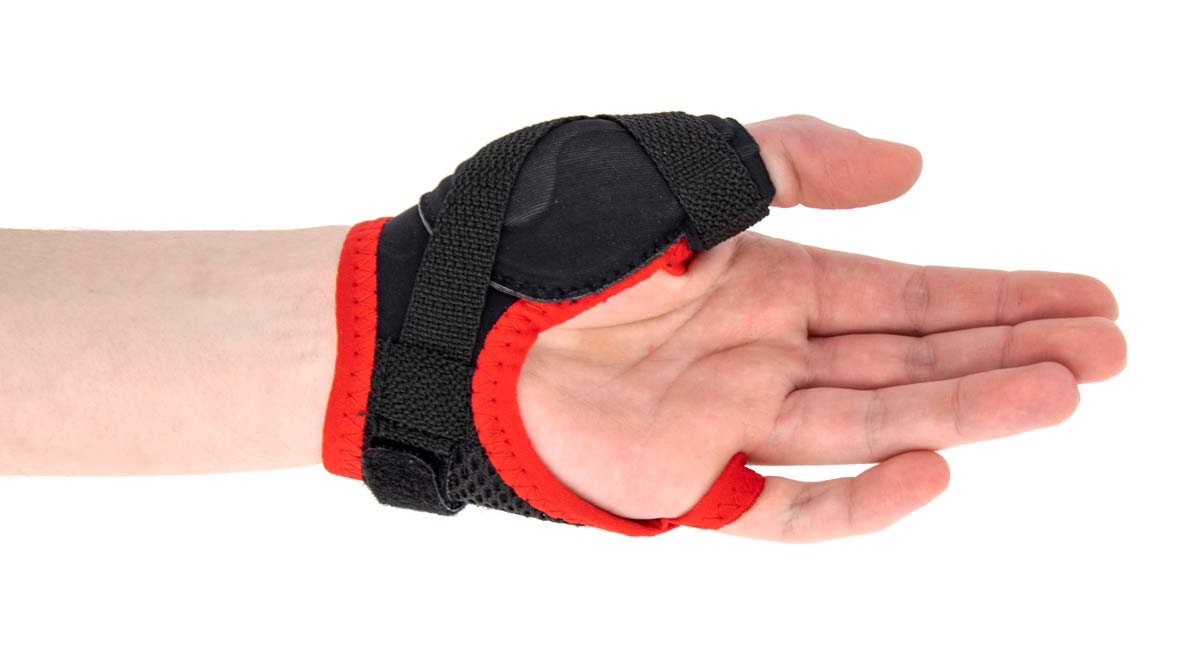
A thumb spica splint is designed to limit the movement of the thumb. It covers the thumb and extends down to the wrist. This design keeps the thumb in a neutral position. By holding the joint still, the splint allows the tendons to rest. The inflammation can then start to go down. Most splints use a combination of hard and soft materials.
- Support: The rigid part of the splint prevents the thumb from bending too far.
- Compression: The fabric part provides a gentle squeeze to reduce swelling.
- Alignment: It keeps the bones and tendons in the correct anatomical place.
- Protection: It protects against more accidental bumps or movements.
Identifying the Need for Support
It is important to know when to start using a thumb splint. You should not wait until the pain is unbearable. Look for these warning signs during your gaming or scrolling sessions:
- Stiffness: Your thumb feels tight when you first wake up in the morning.
- Weakness: You find it hard to open jars or hold a heavy mobile phone.
- Clicking: You hear or feel a popping sound when moving the thumb joint.
- Local Heat: The area around the thumb joint feels warm to the touch.
- Numbness: A tingling sensation travels down the thumb or into the palm.
If you notice these signs, your hand is overstressed. A thumb splint can provide immediate relief. It forces the joint to remain quiet so the body can repair itself.
Proper Usage for Gamers and Mobile Users
Gamers often play for several hours without a break. This is a high-risk activity for thumb injuries. Smartphone users often use one hand to scroll and type. This puts all the stress on a single thumb. A thumb spica splint can be used in several ways:
- Night Wear: Wearing a splint at night reduces the pain felt the next day.
- During Recovery: If you experience pain, it’s better to pause the activity and wear the splint.
- Alternating Hands: Consider using your non-dominant hand for scrolling when you can.
- Task Management: Consider wearing the splint when spending prolonged hours on a mobile device.
Selecting the Right Thumb Splint
There are many types of thumb supports on the market. Choosing the right one is essential for effective recovery.
- Soft Fabric Splints: These are made of neoprene or elastic materials. They are breathable and lightweight. They offer mild support and are good for prevention.
- Semi-Rigid Splints: These contain metal or plastic stays. They provide more stability than soft splints. These are better for those who already have noticeable pain.
- Hard Plastic Splints: These are often used for severe injuries. They completely immobilize the thumb and wrist. These are usually recommended by a doctor.
Ergonomic Changes for Hand Health
Using a thumb spica splint is only one part of the solution. You should also change how you use your devices to prevent further injury.
- Use Larger Grips: Controllers with larger handles reduce the need for tight pinching.
- Phone Stands: Use a stand so you do not have to hold the weight of the phone.
- Frequent Breaks: Every 20 minutes, put the device down and stretch your hands.
- Gentle Stretching: Do light hand stretches to keep the muscles flexible.
These habits, combined with a thumb splint, create a complete protection plan for your hands.
Common Mistakes to Avoid
Many users make mistakes when using a thumb splint. These errors can reduce the effectiveness of the treatment.
- Incorrect Tightness: Do not wear the splint so tight that your fingers turn blue.
- Ignoring Rest: A splint is an effective aid, but it cannot replace the necessity for rest.
- Late Usage: Do not wait for the pain to be severe before using support.
- Poor Alignment: Make sure your thumb is in a balanced position inside the splint.
- Stopping Early: Do not stop using the splint the moment the pain disappears.
Following these guidelines will help you get the most benefit from your thumb spica splint.
Wrapping Up
Managing thumb health is vital in the digital age. A thumb spica splint is a reliable way to reduce pain. It provides the stability your joints need to function. Whether you choose a soft or rigid thumb spica splint, the support is beneficial. It allows the inflammation to settle. It helps you carry out daily tasks with less discomfort.
Remember to use the splint as directed by a professional. Keep up with gentle exercises to stay strong. Proper care of your hands today leads to better function in the future. Repetitive strain does not have to stop your gaming or phone use. With a good thumb splint, you can maintain an active life.
