

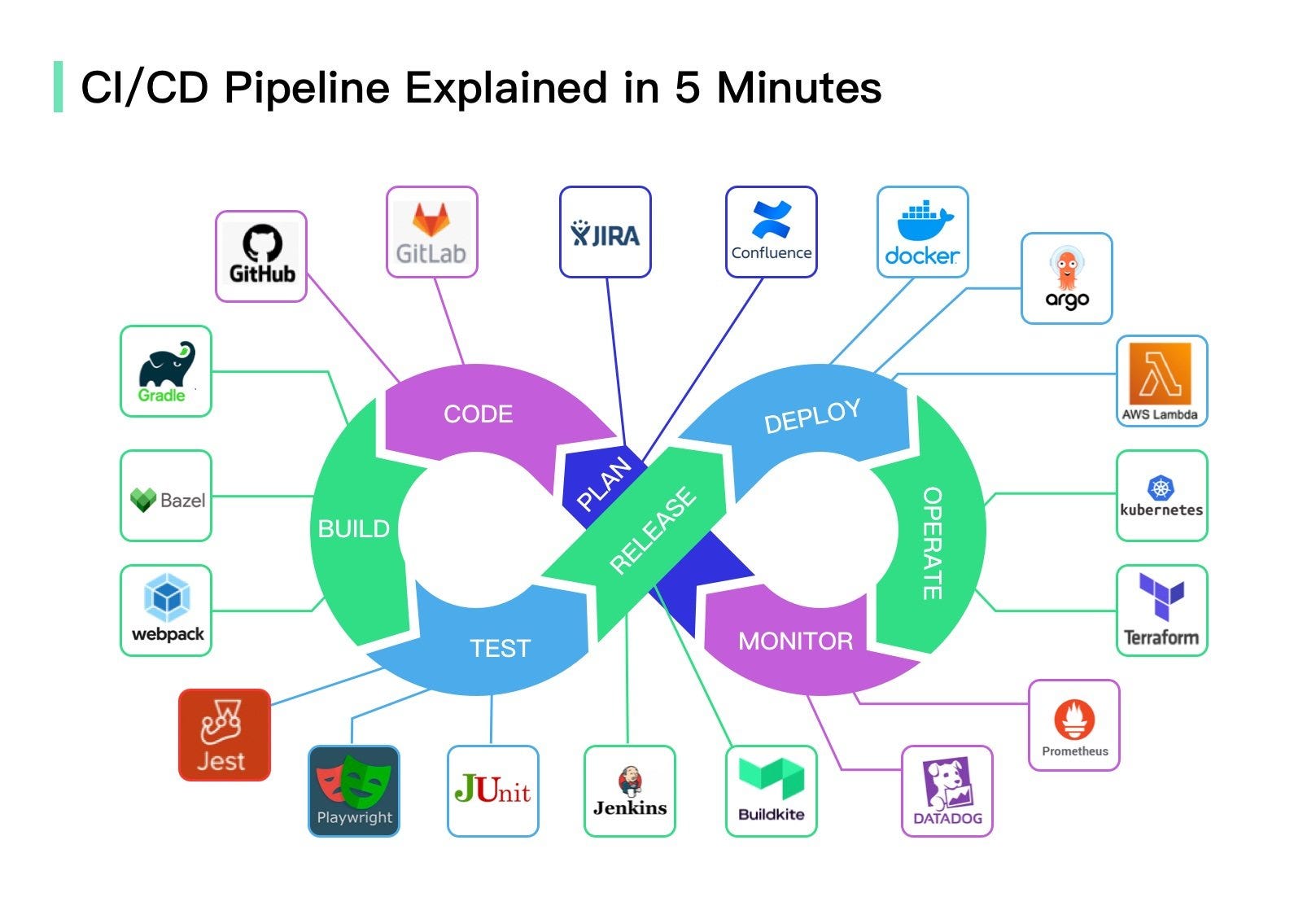
Let’s be honest.
Most people “use” CI/CD long before they understand it. They push code.
Pipelines run.
Green checkmarks appear.
Sometimes red crosses ruin the day.
And everyone pretends they know what’s happening.
If you’ve ever wondered, “What exactly is a CI/CD pipeline doing behind the scenes?” — this is for you.
No jargon. No complicated diagrams. Just a simple explanation using a real-world example.
Let’s start at the beginning. There are multiple devops training institute but devops with placement from reputed institutions offers a comprehensive career path .
First — What Is CI/CD (In Human Language)?
CI/CD stands for:
- CI – Continuous Integration
- CD – Continuous Delivery or Continuous Deployment
But let’s forget the fancy words for a second.
CI/CD is simply a system that:
- Automatically checks your code
- Automatically prepares it
- Automatically sends it to production
Instead of humans doing this manually every time.
Think of CI/CD as a robot assistant for developers.
You write code.
The robot takes care of the boring, repetitive work.
Why Do We Even Need CI/CD?
Before CI/CD existed, deployments looked like this:
- Someone copied files manually
- Someone ran commands on servers
- Someone forgot a step
- Something broke
- Everyone panicked
It was slow. Stressful. Risky.
CI/CD was created to:
- Reduce human mistakes
- Speed up releases
- Improve code quality
- Make deployments boring (in a good way)
Because boring deployments mean stable systems.
Let’s Use a Simple Example (A Small Website)
Imagine this:
You have a simple website that shows:
“Welcome to My App”
Now you want to change it to:
“Welcome to My Awesome App”
That’s it. Just a text change.
Seems small, right?
But even this tiny change goes through the full CI/CD pipeline.
Let’s walk through it step by step.
Step 1: You Write Code (The Human Part)
You open your code editor.
You change one line:
Welcome to My App
to
Welcome to My Awesome App
You save the file.
So far, everything is normal.
Now comes the magic trigger.
Step 2: You Commit and Push Code
You run:
git commit
git push
This is the moment CI/CD wakes up.
You just told the system:
“Hey pipeline, there’s new code. Do your thing.”
From here on, automation takes over.
You can go grab coffee ☕.
Step 3: Continuous Integration Starts (CI Part)
Now the pipeline starts checking your code.
What CI Does First
It pulls your latest code from Git.
Then it:
- Installs dependencies
- Builds the project
- Runs basic checks
In our website example, it might:
- Check HTML syntax
- Validate configuration files
- Make sure nothing is broken
If something fails here, the pipeline stops.
And that’s good.
Because broken code should never reach production.
Why CI Is So Important
Without CI:
- Bugs stay hidden
- Developers merge broken code
- Problems show up late
With CI:
- Errors are caught early
- Teams get fast feedback
- Code quality improves
It’s like having an automatic code reviewer.
Step 4: Automated Tests Run
Now the pipeline runs tests.
In our simple website example, tests could include:
- Does the homepage load?
- Does the server respond?
- Does the app start properly?
For bigger apps, tests can be:
- Unit tests
- API tests
- Security checks
- Performance tests
If tests fail — the pipeline blocks deployment.
No arguments. No shortcuts.
Quality comes first.
Step 5: Build Stage (Preparing the App)
Now the pipeline prepares your app for deployment.
This could mean:
- Creating a build folder
- Packaging files
- Creating a Docker image
- Compressing assets
For our website example, it might:
- Bundle HTML, CSS, and JS files
- Prepare them for hosting
This step creates something called an artifact.
Think of it as a ready-to-ship package.
Step 6: Store the Build (Optional But Important)
Many pipelines store the build output.
Why?
Because:
- You can reuse it
- You can roll back to it
- You can track versions
If today’s deployment fails, you can easily go back to yesterday’s working version.
That’s safety.
Step 7: CD Begins (Continuous Delivery Part)
Now comes the “D” in CI/CD.
This is where code moves closer to users.
In Continuous Delivery:
- The pipeline prepares everything
- But waits for human approval before production
In Continuous Deployment:
- The pipeline deploys automatically
- No manual approval
Let’s assume we use Continuous Deployment.
Step 8: Deployment to Server
Now the pipeline sends your website to the server.
It might:
- Upload files
- Restart the web server
- Update containers
- Reload configuration
All automatically.
No SSH.
No manual commands.
No late-night panic.
Your new message:
“Welcome to My Awesome App”
Is now live.
Step 9: Post-Deployment Checks
Good pipelines don’t stop after deployment.
They verify that everything is working.
They check:
- Is the site responding?
- Are there errors?
- Is performance okay?
If something goes wrong, some pipelines even rollback automatically.
That’s next-level automation.
Step 10: Monitoring Begins
Now real users start using your site.
Monitoring tools track:
- Page load speed
- Errors
- Traffic
- Server health
If something strange happens, alerts are triggered.
You don’t need to “guess” if production is okay.
You can see it.
What Did We Just Automate?
Let’s recap what CI/CD handled for us:
- Code validation
- Build process
- Testing
- Packaging
- Deployment
- Verification
All triggered by one simple git push.
That’s the power of CI/CD.
CI/CD Pipeline in One Sentence
If you had to explain CI/CD to a beginner:
“CI/CD is an automated system that takes your code, checks it, prepares it, and safely sends it to production every time you make a change.”
Simple.
Common Beginner Confusion About CI/CD
❌ Myth: CI/CD Is Only for Big Companies
Truth: Even small projects benefit from automation.
❌ Myth: CI/CD Is Only Jenkins
Truth: Jenkins is just one tool. The idea matters more.
❌ Myth: CI/CD Is Too Complex
Truth: You can start simple and grow gradually.
Why Developers Love CI/CD
Once teams adopt CI/CD, they rarely go back.
Because it:
- Saves time
- Reduces stress
- Improves quality
- Speeds up delivery
- Builds confidence
Instead of fearing deployments, teams trust the pipeline.
Final Thoughts: CI/CD Is Like Cruise Control for Software Delivery
CI/CD doesn’t replace developers.
It supports them.
It handles repetitive work so humans can focus on building better features.
Once you experience smooth automated deployments, manual releases feel outdated.
And that’s exactly why CI/CD has become a core part of modern DevOps.
